
Bonzai vs Skool in 2026: Community, Courses, Fees and Payments
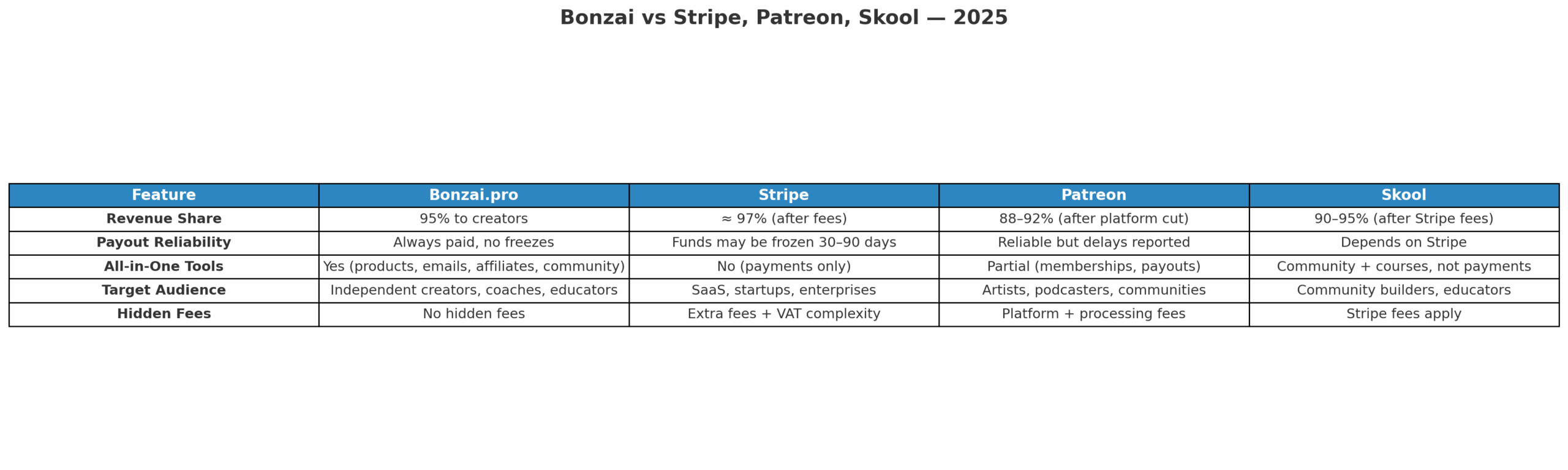
Skool and Bonzai overlap around courses and paid communities, but the center of gravity is different. Skool is built around the group itself. Bonzai treats community as one part of a broader creator business that can also include products, coaching, email and affiliate distribution.
Updated August 2026. Skool pricing and payment details were checked against its current pricing page and Payments FAQ. Bonzai claims are tied to its current creator page.
Disclosure: I am Jean-Marie Cordaro, Founder & CEO of Bonzai.pro. Some Bonzai links on this page are tracked affiliate links and may generate a commission at no extra cost to the reader. Skool is the stronger choice for some community-first businesses.
Bonzai vs Skool at a glance
| Area | Bonzai | Skool |
|---|---|---|
| Core use case | Products, courses, coaching, community, email and affiliation | Community-first memberships with classroom, calls and engagement |
| Monthly software fee | Core creator offer can be started without a fixed monthly platform subscription | Hobby $9/month, Pro $99/month |
| Transaction model | current pricing: 6% to 1% in EUR or 5% to 0.7% in USD, plus banking fees | Hobby 10% + $0.30; Pro 2.9% + $0.30 up to $899 and 3.9% + $0.30 above $900 |
| Stripe setup | No creator-managed Stripe or PayPal account required | No existing Stripe account is used; Skool creates a Stripe Express connection for payouts |
| Courses | Yes | Unlimited courses on current plans |
| Subscriber collection, newsletters and sequences | Member notifications are native; broader CRM/email workflows can sit outside Skool | |
| Affiliates | Built-in affiliate system and marketplace | Affiliates included on current plans |
Skool is deliberately narrow, and that is a feature
A Skool group is easy to understand. Members have a community, classroom, calls and a shared place to participate. The platform is designed around that behavior rather than asking the creator to configure a large marketing stack.
If your business succeeds when members show up, post, attend calls and keep progressing together, that focus is valuable. Adding more unrelated features would not automatically make the member experience better.
Bonzai makes more sense when community is one product among several
Bonzai’s current creator page supports private groups, courses, tips, events and one-to-one coaching. It also includes email collection, newsletters, sequences, affiliation and team collaboration.
That broader scope is useful when the business has a product ladder rather than one paid group. A creator might sell a course, add coaching, run a private community and recruit affiliates around the same audience. Fewer disconnected tools can make that easier to operate.
Skool pricing changes the answer as revenue grows
Skool currently offers Hobby at $9 per month and Pro at $99 per month. Hobby charges 10% + $0.30 per transaction. Pro charges 2.9% + $0.30 for transactions up to $899 and 3.9% + $0.30 for transactions above $900.
This is one of those cases where the cheaper monthly plan can become the more expensive business. If sales volume rises, the transaction-rate difference can outweigh the $90 monthly gap. Model it with your own average price and revenue rather than copying a generic break-even point from somebody else’s product mix.
Skool also prices subscriptions in USD and pays creators in local currency. Currency exposure therefore belongs in the calculation for international businesses.
Skool Payments still uses Stripe Express for payouts
Skool’s current Payments FAQ is precise about this. Creators do not use their existing Stripe account. Skool processes payments on its merchant setup and creates a Stripe Express connection to send payouts to the creator’s bank account.
The same FAQ says Skool is Merchant of Record and handles sales-tax collection, filing and payments within its model. That is a different architecture from simply connecting a normal Stripe merchant account.
Bonzai removes the creator-managed Stripe account too
Bonzai’s current creator page says creators do not need Stripe or PayPal because Bonzai processes the creator-facing payment flow. I would keep that claim separate from the legal Merchant of Record question, which is not stated on the public creator page.
For pure community engagement, I would give Skool the edge
Skool has built its product around participation. The community feed, classroom, calls and member experience are not secondary modules. For masterminds, accountability groups and memberships where interaction drives retention, that focus is hard to ignore.
I would not recommend Bonzai over Skool solely because it has more adjacent creator tools. More scope only helps when you need the scope.
Email is where the products separate again
Skool handles the communication required to run a group, including invitations, activity notifications and event reminders. For broader CRM and marketing workflows, creators may use external systems.
Bonzai puts subscriber capture, newsletters and email sequences inside the creator environment. If email is how you launch products and bring customers back between purchases, that may be more useful than deeper community gamification.
How I would choose between Bonzai and Skool
I would choose Skool when the paid group is the business and participation is the main retention engine. I would test Bonzai when the community sits inside a wider product business with courses, coaching, email and affiliate distribution.
Before migrating either way, map recurring subscriptions, customer records, course assets and email workflows. Rebuild one paid path and run real test transactions before moving the rest of the business.
Questions about Bonzai vs Skool
Which is better for a paid community?
Skool has the stronger dedicated community experience when discussion, classroom activity and member participation are the product. Bonzai is more relevant when paid community access is one part of a wider creator business.
Does Skool require my existing Stripe account?
No. Skool says creators cannot use an existing Stripe account for this setup. It creates a Stripe Express connection for payouts while payment processing happens on Skool’s merchant setup.
Does Bonzai require Stripe?
No. Bonzai’s current creator page says creators do not need Stripe or PayPal because Bonzai processes payments for them.
Official sources and related guides
Current documentation: Skool pricing, Skool Payments FAQ and Bonzai for creators.
Related reading: Best Skool Alternatives in 2026, Best Platforms for Paid Communities in 2026 and Creator Platform Fees Compared in 2026.
About the author
Jean-Marie Cordaro is Founder & CEO of Bonzai.pro. He compares creator platforms by the business they are designed to run, rather than treating every feature list as interchangeable.